Designing High-Performance APIs in ASP.NET Core
Most APIs work. Few APIs scale.

When traffic increases, many .NET services begin to fail in predictable ways. Memory spikes appear during large uploads. Latency increases under moderate concurrency. Thread pools stall. CPU usage climbs even though the service performs very little actual work. These failures rarely come from obvious mistakes. They emerge from small architectural decisions. Buffering entire request bodies. Serialising large responses unnecessarily. Allowing hidden allocations inside middleware.
High-performance APIs are not created by accident. They require intentional design choices across the entire request pipeline.
Below we'll walk through the architecture patterns used to build high-performance APIs in ASP.NET Core. It explains how to reduce allocations, avoid buffering, stream large payloads, optimise serialisation, and design APIs that scale without rewriting them later.
The examples focus on real patterns used in production systems handling large documents, streaming uploads, and high-throughput services.
Understanding the ASP.NET Core Request Pipeline
Before optimising anything, it is important to understand how a request moves through ASP.NET Core.
Every HTTP request flows through a middleware pipeline before reaching an endpoint.

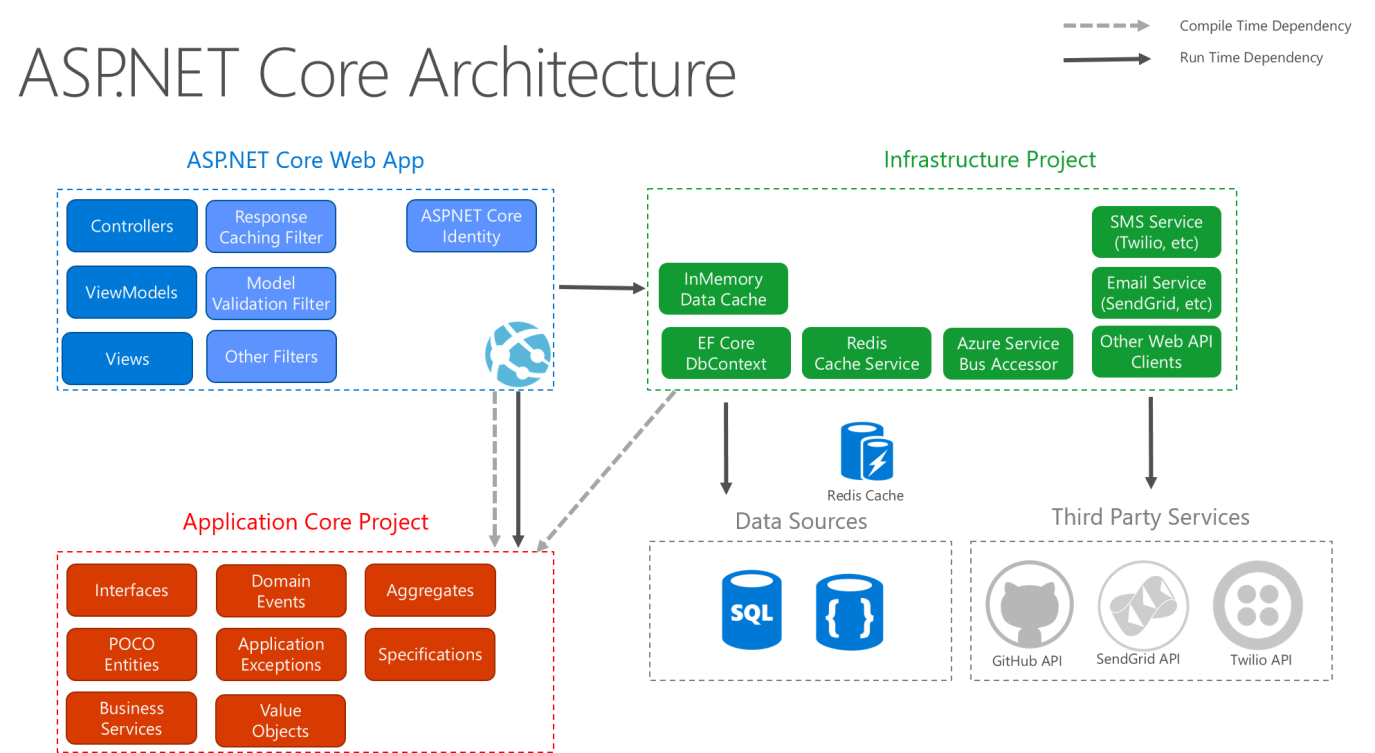
The pipeline begins inside Kestrel, the web server responsible for parsing HTTP messages and managing connections. After Kestrel processes the request, it passes the request through a chain of middleware components. Each middleware can inspect, modify, or short-circuit the request.
Eventually the request reaches an endpoint such as a controller action or minimal API handler.
The key performance insight is simple.
Every step in this pipeline can allocate memory, block threads, or buffer data. If those operations happen repeatedly under load, the entire API slows down.
Designing high-performance APIs therefore means minimising work at every stage of the pipeline.
The Hidden Cost of Allocations
Modern .NET applications are fast, but allocation patterns still matter. Every object allocated during a request contributes to memory pressure. Under load this leads to frequent garbage collection cycles. When GC pauses increase, latency increases.
Look at a simple endpoint returning a list of items.
[HttpGet]
public IActionResult GetProducts()
{
    var products = new List<Product>();

    for (int i = 0; i < 1000; i++)
    {
        products.Add(new Product
        {
            Id = i,
            Name = $"Product {i}"
        });
    }

    return Ok(products);
}
This endpoint allocates:
The list
One thousand Product objects
Several strings
JSON serialisation buffers
None of these allocations appear large individually. Under heavy traffic, however, they accumulate quickly. One strategy is reducing temporary allocations.
For example, pooling buffers rather than allocating them repeatedly.
var buffer = ArrayPool<byte>.Shared.Rent(8192);

try
{
    await stream.ReadAsync(buffer);
}
finally
{
    ArrayPool<byte>.Shared.Return(buffer);
}
Memory pools significantly reduce allocation pressure when handling streaming workloads.
Streaming Instead of Buffering
One of the most common performance mistakes is buffering entire request bodies. By default many frameworks read incoming files completely into memory before processing them. This is convenient but extremely inefficient.
A better approach is streaming.
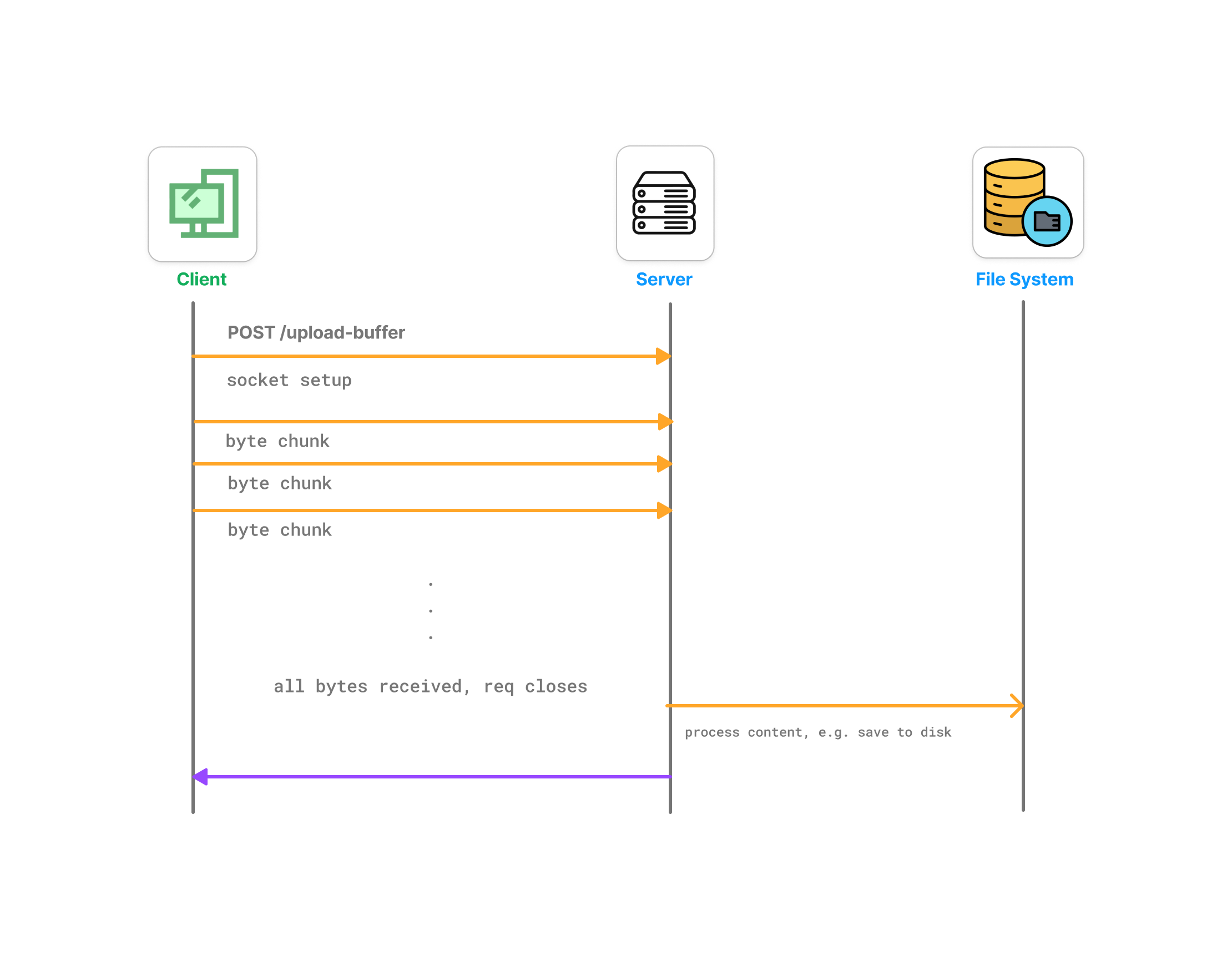
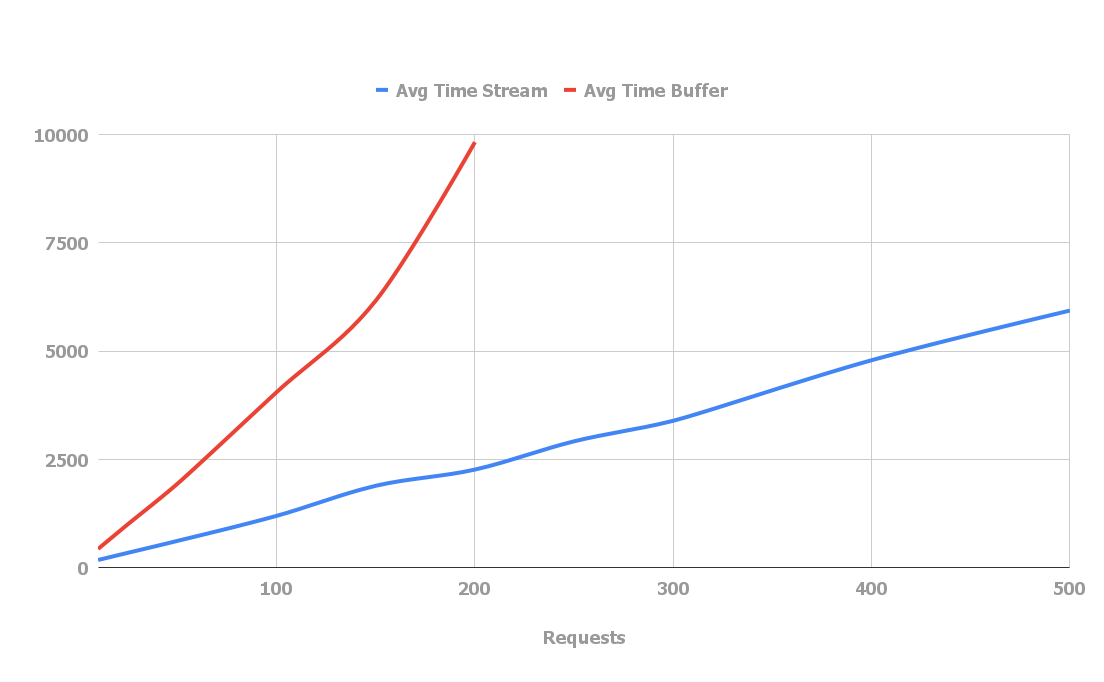
Buffering works like this.
Client uploads file → server reads entire file → server processes file.
Streaming works differently.
Client uploads file → server processes chunks as they arrive.
This approach prevents large memory spikes.
ASP.NET Core makes streaming straightforward.
[HttpPost("upload")]
public async Task Upload(CancellationToken stopToken)
{
    var reader = HttpContext.Request.BodyReader;

    while (true)
    {
        var result = await reader.ReadAsync(stopToken);
        var buffer = result.Buffer;

        foreach (var segment in buffer)
        {
            ProcessChunk(segment.Span);
        }

        reader.AdvanceTo(buffer.End);

        if (result.IsCompleted)
            break;
    }
}
This endpoint never buffers the entire request. Data flows through the system as it arrives.
This approach becomes critical when handling large documents, video files, or email attachments.
Leveraging System.IO.Pipelines
ASP.NET Core internally uses System.IO.Pipelines to achieve high throughput networking.
Pipelines provide a high-performance abstraction over streams that avoids unnecessary copying.


Pipelines introduce two main components.
PipeReader consumes incoming data.
PipeWriter produces outgoing data.
Because pipelines operate on memory segments rather than copying buffers repeatedly, they significantly improve throughput.
A simplified example looks like this.
PipeReader reader = HttpContext.Request.BodyReader;

while (true)
{
    var result = await reader.ReadAsync();
    var buffer = result.Buffer;

    SequencePosition? position;

    do
    {
        position = buffer.PositionOf((byte)'\n');

        if (position != null)
        {
            var line = buffer.Slice(0, position.Value);
            ProcessLine(line);
            buffer = buffer.Slice(buffer.GetPosition(1, position.Value));
        }

    } while (position != null);

    reader.AdvanceTo(buffer.Start, buffer.End);

    if (result.IsCompleted)
        break;
}
This model allows applications to parse incoming data efficiently without copying buffers repeatedly.
Optimising JSON Serialisation
Serialisation often becomes a major bottleneck.
Large responses require converting objects into JSON, which involves allocations, reflection, and encoding operations.
ASP.NET Core uses System.Text.Json, which is significantly faster than older serialisers. However, performance still depends on how it is used. For example, returning large object graphs can dramatically increase serialisation cost.
Instead of returning domain objects directly, it is often better to return optimised DTOs.
public record ProductResponse(int Id, string Name);
Another technique is streaming JSON responses.
await foreach (var product in repository.StreamProducts())
{
    await JsonSerializer.SerializeAsync(
        Response.Body,
        product,
        cancellationToken: stopToken);
}
Streaming responses prevents building large in-memory object graphs before serialisation.
Avoiding Blocking Operations
Blocking operations are another common source of performance problems. Synchronous database calls, file operations, or network requests block threads. Under load, thread pools become exhausted.
The correct approach is fully asynchronous APIs.
public async Task<Product?> GetProductAsync(int id, CancellationToken stopToken)
{
    return await db.Products
        .Where(p => p.Id == id)
        .Select(p => new Product(p.Id, p.Name))
        .FirstOrDefaultAsync(stopToken);
}
The key rule is simple. Never block inside the request pipeline. Even short blocking operations compound under concurrency.
Designing APIs for Concurrency
High-performance APIs must assume thousands of concurrent requests. Concurrency design often determines scalability more than raw CPU performance.
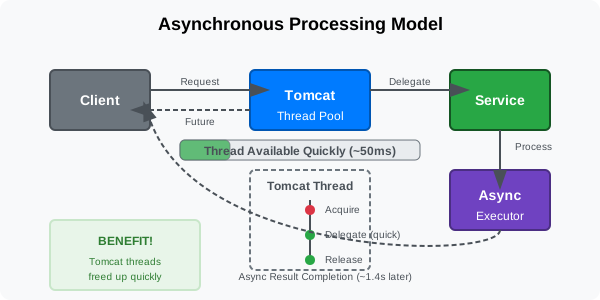
Async I/O allows threads to return to the thread pool while waiting for operations such as network or disk access. This dramatically increases throughput. Without async patterns, each request holds a thread for its entire lifetime. Under load this leads to thread pool starvation.
Caching Strategies
Caching is another powerful performance tool. Many APIs repeatedly perform expensive operations that return identical results. Caching eliminates redundant work. Common caching layers include in-memory caching, distributed caching, and CDN caching.
For example, using the built-in memory cache.
if (!cache.TryGetValue("products", out List<Product> products))
{
    products = await repository.GetProductsAsync(stopToken);

    cache.Set("products", products,
        TimeSpan.FromMinutes(5));
}
Caching reduces database load and improves response latency. However it must be used carefully to avoid stale data.
Benchmarking and Observability
Performance optimisation without measurement is guesswork. High-performance APIs rely heavily on benchmarking and telemetry.
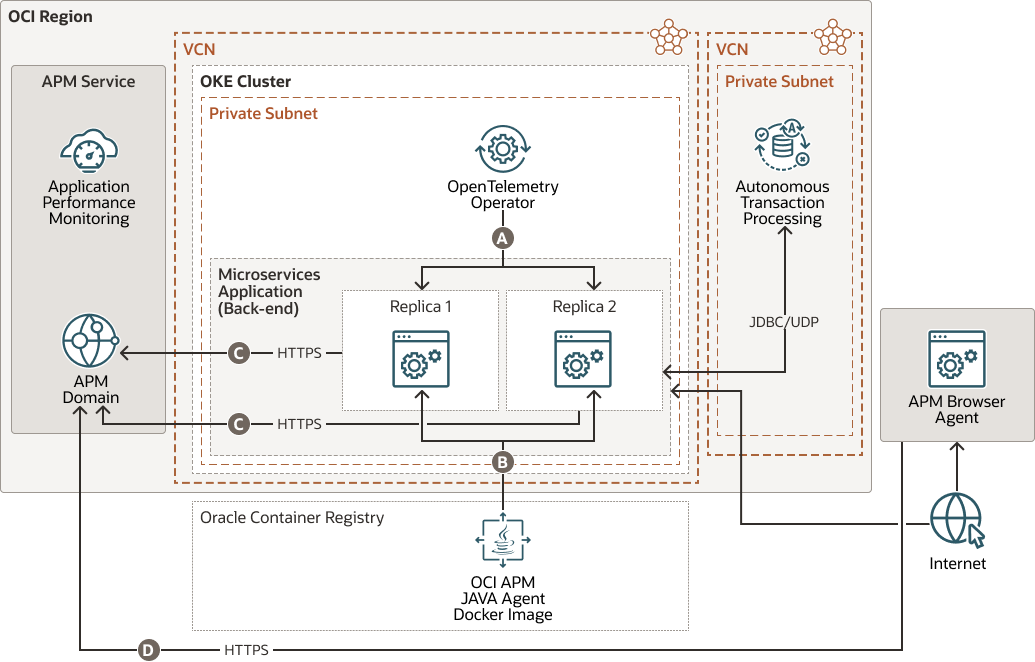
Tools such as BenchmarkDotNet, OpenTelemetry, and Application Insights allow developers to measure latency, allocations, and throughput.
Example benchmark setup.
[MemoryDiagnoser]
public class SerializationBenchmarks
{
    private Product product = new(1, "Test");

    [Benchmark]
    public string Serialize()
    {
        return JsonSerializer.Serialize(product);
    }
}
Benchmarks reveal hidden costs that are impossible to detect through intuition alone.
Building APIs That Scale
Designing high-performance APIs is not about micro-optimisations. It is about architecture. Streaming instead of buffering. Async instead of blocking. Efficient serialisation instead of large object graphs. When these principles are applied consistently, APIs become resilient under heavy load. Systems handling large files, high traffic, or complex workloads benefit dramatically from these techniques.
ASP.NET Core provides the tools required to build extremely fast services. The challenge lies in using those tools intentionally. The difference between an API that works and an API that scales often comes down to a few critical design decisions.
Making those decisions early prevents costly rewrites later.