Why I Choose ArchGuard.NET for a Modular Monolith with Vertical Slices

You'll find that architecture tests are easy to introduce when a codebase is small. The module boundaries are clear, the dependencies are tidy, and theres very little history to accommodate. Introduce those same tests into an application that's been running for several years and the first result can be hundreds of failures. A claims handler reaches into submissions infrastructure. A feature reuses another feature's request type. A shared helper has gradually become a route around the module contracts.
You still want architecture checks. You also need to keep delivering software while you address what they find and simply dont have time to address the 300 alerts. Thats where ArchGuard.NET becomes an attractive alternative to ArchTestNet, a small API, built-in rules for modular monoliths and vertical slices, and a baseline feature that lets you record existing violations automatically while failing the build when new ones appear. For a modern .NET application organised around business modules and individual use cases, that combination can make architecture testing much easier to adopt and maintain.

What the comparison actually covers
There are several similarly named libraries here. ArchTestNet is a fork of NetArchTest, published under its own NuGet package. ArchUnitNET is another project. This article compares ArchGuard.NET with ArchTestNet and the familiar NetArchTest style of expressing rules. ArchTestNet already provides a concise fluent API. You select types, apply conditions, and assert the result. Its a useful approach for naming conventions and dependency restrictions.
ArchGuard's advantage for this particular architecture is that it supplies more of the policy you would otherwise assemble yourself. Its module preset understands a namespace root and the namespaces other modules may reference. Its slice preset checks dependencies between features. Baseline handling sits alongside those rules in the same builder.
| Concern | ArchTestNet's documented approach | ArchGuard.NET's approach |
|---|---|---|
| Dependency restrictions | Select types and express conditions | Namespace prohibitions and architecture presets |
| Module boundaries | Compose the policy from dependency rules | Configure a module root and permitted contract namespaces |
| Feature isolation | Express restrictions for feature namespaces | Configure a feature root with UseVerticalSlices |
| Existing violations | The documented API doesn't provide a built-in JSON baseline workflow | Record violations and fail only on new fingerprints |
| Reporting | Evaluate rule or policy results | Grouped failures and baseline comparison results |
| Framework target | Includes .NET Standard 2.0 and .NET Framework 4.6.1 | Version 1.0.0 targets .NET 10 |
Here, lightweight describes the amount of configuration and supporting code needed for these checks. It isn't a claim about benchmark results or a smaller package download. ArchTestNet and NetArchTest are themselves small libraries, and both approaches use compiled assembly inspection with Mono.Cecil.
The boundaries a modular monolith needs
Take an insurance application with Claims, Submissions and Underwriting modules. Each module contains contracts, infrastructure and feature namespaces.
| Namespace | Responsibility |
|---|---|
Insurance.Modules.Claims.Contracts |
Public types other modules may consume |
Insurance.Modules.Claims.Features.RegisterClaim |
The register-claim use case |
Insurance.Modules.Claims.Features.GetClaim |
The get-claim use case |
Insurance.Modules.Claims.Infrastructure |
Persistence and other implementation details |
Insurance.Modules.Submissions.Contracts |
The public submissions boundary |
Insurance.Modules.Submissions.Infrastructure |
Submissions implementation details |
Claims may need submission information. A reasonable design lets Claims consume the Submissions contract while Submissions owns the database access behind it.
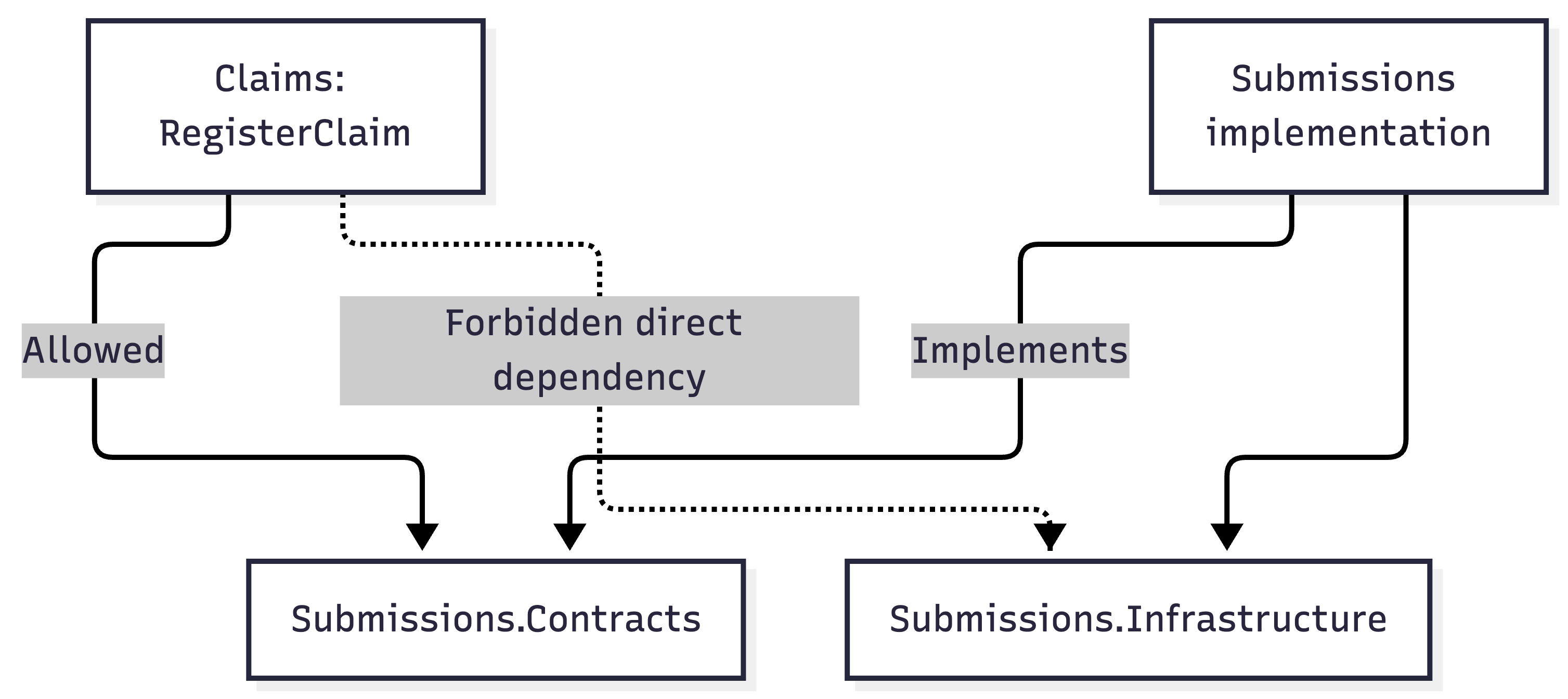
The arrows represent code dependencies. The contract implementation can live within Submissions and use its own infrastructure. Claims only needs the public boundary. A modular monolith running in one process makes this especially easy to undermine. A reference to another module's implementation can be convenient, compile successfully, and pass functional tests. Architecture tests give that dependency a separate check.
Start with the module policy
Create an architecture test project targeting .NET 10 and add ArchGuard:
dotnet new xunit -n Insurance.Architecture.Tests --framework net10.0
dotnet add Insurance.Architecture.Tests package ArchGuard.Net --version 1.0.0
Add project references to the production modules you intend to inspect. For the examples below, assume each module project exposes a simple marker type in its root namespace:
namespace Insurance.Modules.Claims;

public sealed class ClaimsAssemblyMarker { }
Submissions and Underwriting expose equivalent marker types. These give the tests an explicit list of assemblies to scan.
using ArchGuard;
using Insurance.Modules.Claims;
using Insurance.Modules.Submissions;
using Insurance.Modules.Underwriting;
using Xunit;

public sealed class ModuleBoundaryTests
{
    [Fact]
    public void Modules_should_use_public_boundaries()
    {
        ArchitectureRules
            .ForAssemblies(
                typeof(ClaimsAssemblyMarker).Assembly,
                typeof(SubmissionsAssemblyMarker).Assembly,
                typeof(UnderwritingAssemblyMarker).Assembly)
            .UseModularMonolith(configuration =>
            {
                configuration.ModuleNamespaceRoot = "Insurance.Modules";
                configuration.AllowedCrossModuleNamespaces = [".Contracts"];
            })
            .Assert();
    }
}
This recognises module names immediately beneath Insurance.Modules. Dependencies between different modules must target an allowed namespace, such as Insurance.Modules.Submissions.Contracts. The preset also adds a separate rule against references to another module’s Infrastructure namespace. If your design has public client namespaces, you can add ".Client" to the allowed list. That should reflect a deliberate public boundary in your application. The configuration applies the convention across the scanned modules. Adding a fourth module under the same namespace root doesn’t require another collection of pairwise prohibitions, provided its assembly is included in the scan. An explicit assembly list also makes the scope reviewable. Scanning Claims alone would inspect dependencies originating in Claims; it wouldn’t check all the code originating in Submissions and Underwriting.
Vertical slices introduce another boundary
Module isolation leaves a second question, how much should features within a module know about one another? Suppose RegisterClaim starts depending on the handler or request object belonging to GetClaim. That creates a reason for a change in one use case to affect another. Over time, feature folders can conceal a tightly coupled implementation. For Devs that want independent slices, ArchGuard provides a rule for preventing those direct dependencies.
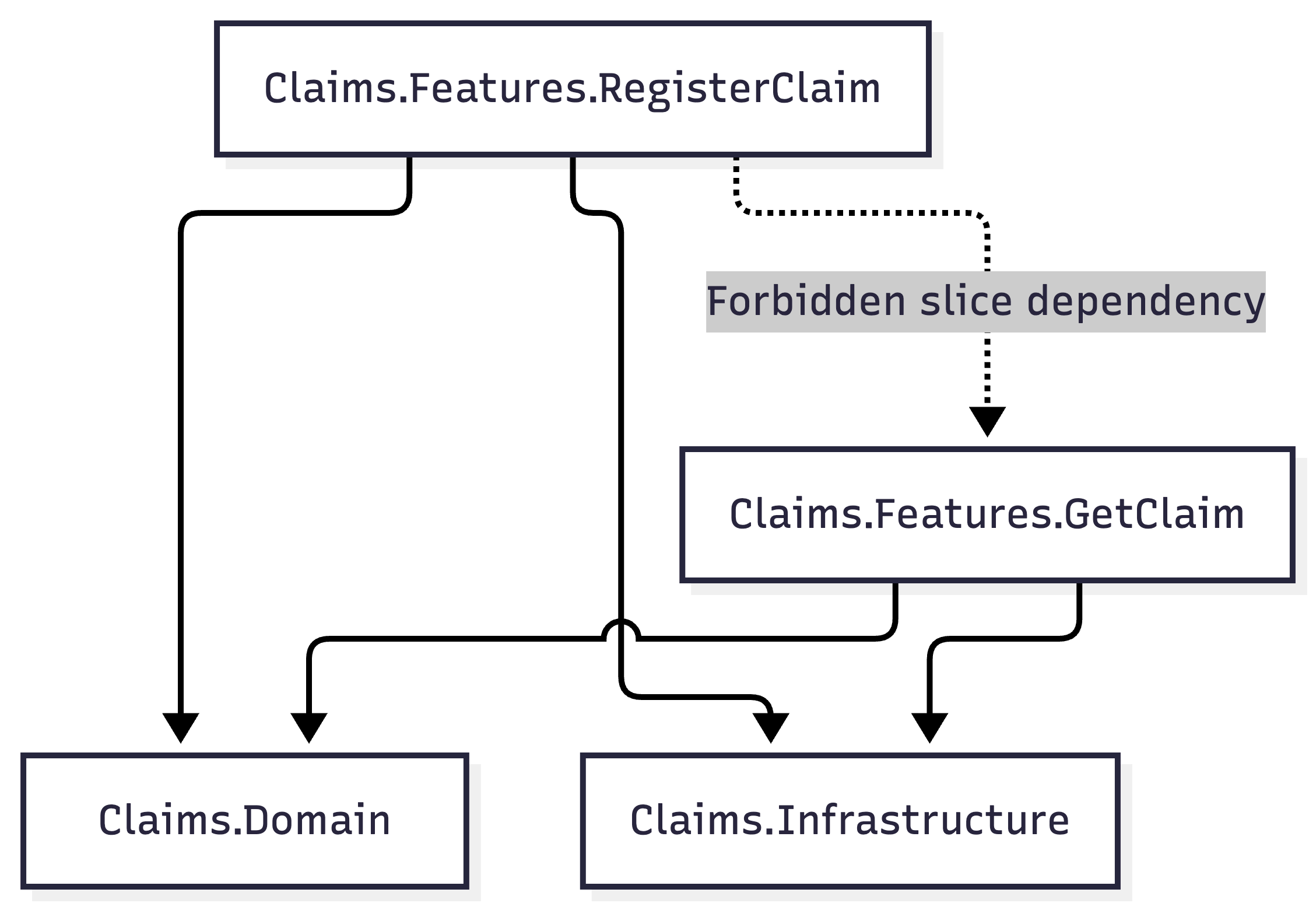
This example deliberately permits a slice to use its own module's persistence code. That can be a valid vertical slice design, a handler can query the database directly without introducing application-wide repository and service layers.
The policy protects feature independence while allowing the modules chosen implementation style.
ArchitectureRules
    .ForAssemblies(typeof(ClaimsAssemblyMarker).Assembly)
    .UseVerticalSlices(configuration =>
    {
        configuration.FeatureNamespaceRoot =
            "Insurance.Modules.Claims.Features";
    })
    .Assert();
Here, RegisterClaim and GetClaim are different features because they are the next namespace segments beneath the configured feature root. Configure this rule separately for each modules feature root. Setting FeatureNamespaceRoot to Insurance.Modules would treat Claims, Submissions and Underwriting as the features. It wouldn’t express isolation between the individual use cases inside Claims. Dependencies outside that feature root aren't generally prohibited by the slice rule. A module-level Domain or Shared namespace therefore needs its own design discipline and any additional rules your application requires.
Combine module and slice checks
The following configuration brings both policies together. It assumes the three module marker types introduced above and the corresponding project references.
using System.Runtime.CompilerServices;
using ArchGuard;
using Insurance.Modules.Claims;
using Insurance.Modules.Submissions;
using Insurance.Modules.Underwriting;
using Xunit;

public sealed class ArchitectureTests
{
    private static ArchitectureRuleBuilder ConfigureRules()
    {
        var rules = ArchitectureRules
            .ForAssemblies(
                typeof(ClaimsAssemblyMarker).Assembly,
                typeof(SubmissionsAssemblyMarker).Assembly,
                typeof(UnderwritingAssemblyMarker).Assembly)
            .UseModularMonolith(configuration =>
            {
                configuration.ModuleNamespaceRoot = "Insurance.Modules";
                configuration.AllowedCrossModuleNamespaces = [".Contracts"];
            });

        string[] modules = ["Claims", "Submissions", "Underwriting"];

        foreach (var module in modules)
        {
            rules.UseVerticalSlices(configuration =>
            {
                configuration.FeatureNamespaceRoot =
                    $"Insurance.Modules.{module}.Features";
            });
        }

        return rules;
    }

    private static string BaselinePath(
        [CallerFilePath] string sourceFile = "") =>
        Path.Combine(
            Path.GetDirectoryName(sourceFile)!,
            "architecture-baseline.json");

    [Fact]
    public void Architecture_should_have_no_new_violations()
    {
        ConfigureRules()
            .WithBaseline(BaselinePath())
            .FailOnlyOnNewViolations()
            .Assert();
    }

    [Fact(Skip = "Run explicitly when reviewing baseline changes.")]
    public void Update_architecture_baseline()
    {
        ConfigureRules()
            .WithBaseline(BaselinePath())
            .UpdateBaseline()
            .Assert();
    }
}
Both tests use the same rule configuration. The normal test compares the current findings with the baseline. The skipped maintenance test records the current findings when you explicitly choose to run it. The path helper places the JSON file beside this test source file, avoiding a baseline that accidentally gets created in a build output directory. It assumes tests are built and run in the same checkout, as in a typical CI job. If your pipeline transfers prebuilt tests between machines, supply a path within the current checkout instead. Once this combined test is in place, it can replace the earlier standalone demonstrations. Keeping those strict, unbaselined tests would still fail the build for existing violations.
Baselines make adoption practical
Imagine the first scan finds 37 violations. You review them and agree that they represent existing debt the team will address incrementally. To create the initial baseline, temporarily remove Skip from the maintenance test and run only that test:
dotnet test Insurance.Architecture.Tests/Insurance.Architecture.Tests.csproj \
  --filter "FullyQualifiedName~Update_architecture_baseline"
Restore the Skip attribute, review the generated JSON and commit it alongside the tests. From then on, the normal architecture test uses that checked-in baseline. WithBaseline(...) selects the file. FailOnlyOnNewViolations() selects the comparison behaviour. You need both for this workflow; specifying a baseline path alone doesn’t enable suppression of existing violations.
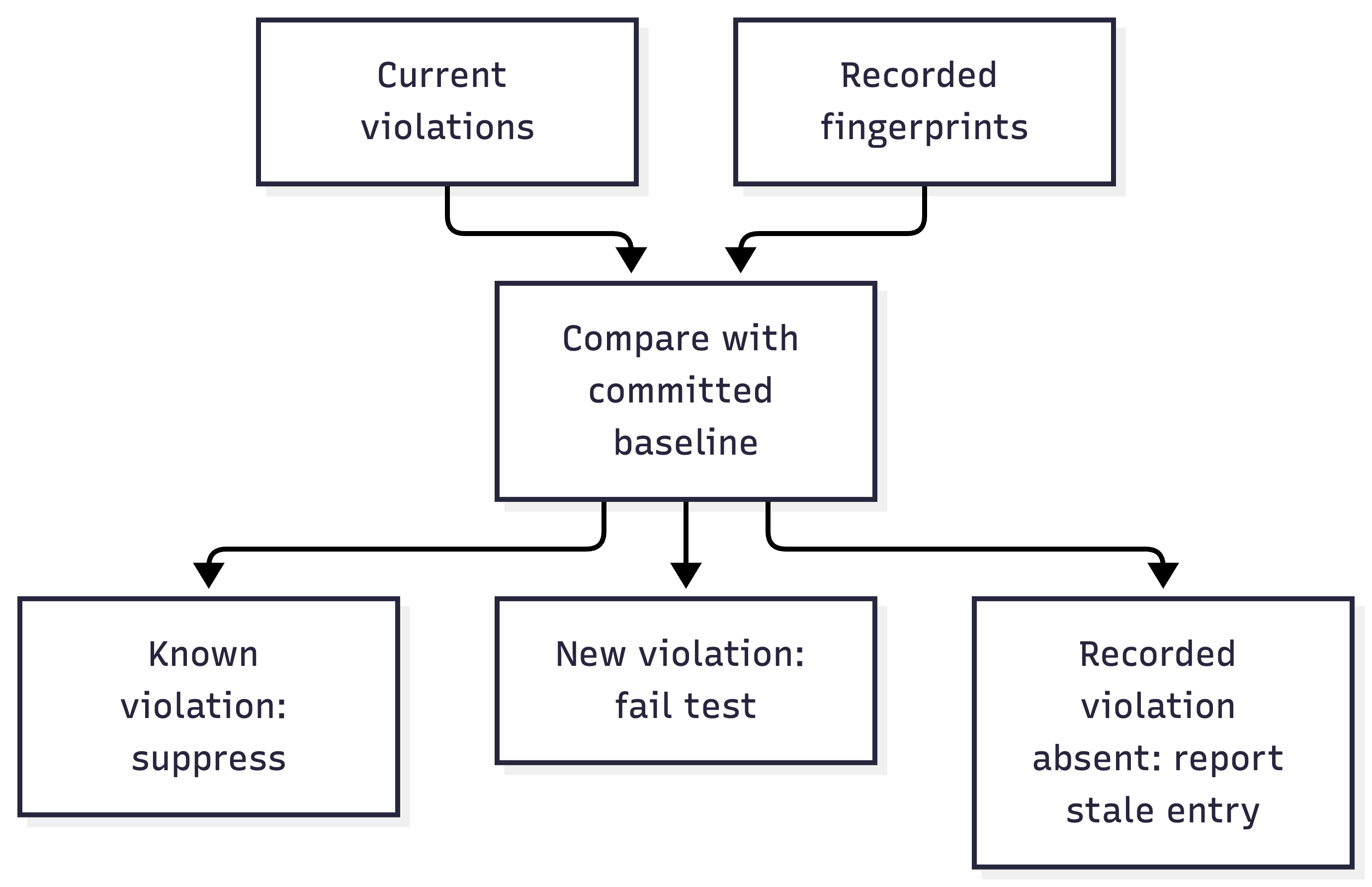
Now suppose a developer adds a new Claims dependency on an Underwriting infrastructure type. The 37 recorded violations remain accepted, but the new dependency fails the test. This avoids making a complete architectural cleanup a prerequisite for introducing architecture checks. The team can prevent additional debt while scheduling the existing work.
A baseline records identities, rather than a permitted count
There's a substantial difference between accepting 37 particular violations and allowing any 37 violations. If one violation is fixed and another is introduced, a count based check could still pass. ArchGuard compares fingerprints derived from the rule identifier, source assembly and type, and target assembly and type. A different dependency produces a different identity even when the total stays the same. That also defines the granularity of the check. It records a type to type dependency under a rule. Additional uses of an already accepted dependency between those same types don't necessarily become separate new violations. Renaming a type or moving it between assemblies can change its fingerprint. Baseline changes during those refactorings need reviewing as part of the work.
Remove fixed violations from the baseline
When a recorded dependency disappears, ArchGuard exposes it as a stale baseline entry. Normal comparison doesn’t automatically rewrite the file. Remove fixed entries as you clean up the code. Otherwise, the same dependency could return later and still match its old accepted fingerprint. Keep baseline updates explicit. Automatically calling UpdateBaseline() during every build would continually accept the violations the tests are meant to catch. A useful review policy is to expect the baseline to shrink, and to require an explanation whenever it grows.
Keep the checks aligned with your architecture
Architecture testing libraries offer rules for several designs. Choose the ones that express the application you’re building. For example, ArchGuard includes ApiShouldNotUseEfCoreDirectly. That can suit a design where transport endpoints must delegate persistence work elsewhere. Applying it indiscriminately across a vertical slice implementation could prohibit database access that the team intentionally allows. Likewise, feature isolation is a policy choice. If your design deliberately permits orchestration between certain use cases, an absolute prohibition needs reconsidering. A shared domain operation or explicit module contract may provide a better boundary, depending on the behaviour involved. For the architecture in this article, I'd start with the module boundary, approved public contracts, infrastructure isolation and independent feature namespaces. Those checks capture clear decisions without imposing an unrelated layered structure on every slice.
Run the policy in CI
Architecture tests run through the ordinary test pipeline. For a GitHub Actions job that has checked out the repository and installed the .NET 10 SDK, the relevant step is:
- name: Check architecture boundaries
  run: >-
    dotnet test
    Insurance.Architecture.Tests/Insurance.Architecture.Tests.csproj
    --configuration Release
Build the referenced production projects as part of that run, keep the JSON baseline in source control, and leave the maintenance test skipped. Failures identify the source and target types, grouped by rule identifier. Baseline comparison results also expose accepted violations and stale entries. This gives a reviewer a concrete dependency to inspect rather than a general instruction to preserve modularity. ArchGuard can also write a simple Mermaid graph from evaluated violations. That can help illustrate problem areas, although the current writer produces a simplified view of violation dependencies rather than a complete architecture map.
What to account for before adopting it
ArchGuard.NET 1.0.0 targets .NET 10. Applications requiring architecture tests on older runtimes may need a library with broader framework support. Its rules inspect compiled dependencies and use namespace conventions. Moving a file between folders without changing its namespace wont change how the rules classify it. Reflection, dynamic loading, runtime dispatch and database access expressed through strings can also escape the dependency relationships these checks inspect. Method body inspection is best effort.
Contract namespaces need care too. Allowing .Contracts permits references into that namespace; it doesnt establish that every type placed there is an appropriate public contract. Review the contents of the boundary as well as the dependencies crossing it. These are useful limits to understand when deciding what belongs in architecture tests and what still needs other checks or code review.
Why I'd choose ArchGuard for this setup
For a .NET 10 modular monolith with vertical slices, ArchGuard puts several recurring requirements within a small configuration surface. Define the modules, identify their public boundaries, configure the feature roots, and decide how existing debt should be treated. ArchTestNet remains useful for fluent type and dependency checks. ArchGuard offers a better fit when the work you need is enforcing module and slice conventions while introducing those checks into an existing application. The baseline is a large part of that choice. A team can check in an honest record of todays violations, stop new dependencies from crossing the agreed boundaries, and remove accepted exceptions as the code improves.
You can find the package on NuGet and the implementation on GitHub.
- ArchGuard.Net 1.0.0 package and framework target
- ArchGuard.NET repository and usage documentation
- Rule builder and baseline modes
- Module boundary implementation
- Infrastructure boundary implementation
- Vertical slice boundary implementation
- Violation fingerprints
- Baseline comparison and persistence
- Compiled dependency scanner
- Mermaid report implementation
- ArchTestNet package
- ArchTestNet fork and documented API
- NetArchTest upstream project
About the author
- Senior Software Engineer specialising in cloud architecture, distributed systems, and modern .NET development, with over two decades of experience designing and delivering enterprise platforms in financial, insurance, and high-scale commercial environments. My focus is on building systems that are reliable, scalable, and maintainable over the long term. I’ve led modernisation initiatives moving legacy platforms to cloud-native Azure architectures, designed high-throughput streaming solutions to eliminate performance bottlenecks, and implemented secure microservices environments using container-based deployment models and event-driven integration patterns. From an architecture perspective, I have strong practical experience applying approaches such as Vertical Slice Architecture, Domain-Driven Design, Clean Architecture, and Hexagonal Architecture. I’m particularly interested in modular system design that balances delivery speed with long-term sustainability, and I enjoy solving complex problems involving distributed workflows, performance optimisation, and system reliability. I enjoy mentoring engineers, contributing to architectural decisions, and helping teams simplify complex systems into clear, maintainable designs. I’m always open to connecting with other engineers, architects, and technology leaders working on modern cloud and distributed system challenges.
Comments
Join the discussionNo comments yet. Be the first to comment.